How the AI answers
Where the AI gets its answers, its personality, web search, and testing.
Written By Bram Haenraets
Last updated 4 months ago
Your AI Operator is the reactive side of Viqal — how the assistant replies to incoming guest messages. This page covers what it knows, how it sounds, and how to check its answers. You manage all of it from the AI Behaviour screen in the sidebar.
Where answers come from
Your AI answers from your own property knowledge — rooms, policies, amenities, local recommendations and FAQs. The What your AI knows card shows this as a connected map and links into each area so you can fill gaps; the more complete your knowledge, the more accurate the answers. Build it out in Property Setup. Whatever you set here applies everywhere the AI talks to guests — your website widget, QR-code chats, and AI replies in the Team Inbox.
Personality
Your AI's personality sets the tone of every guest message — formality, first names or titles, sentence length, the occasional emoji.
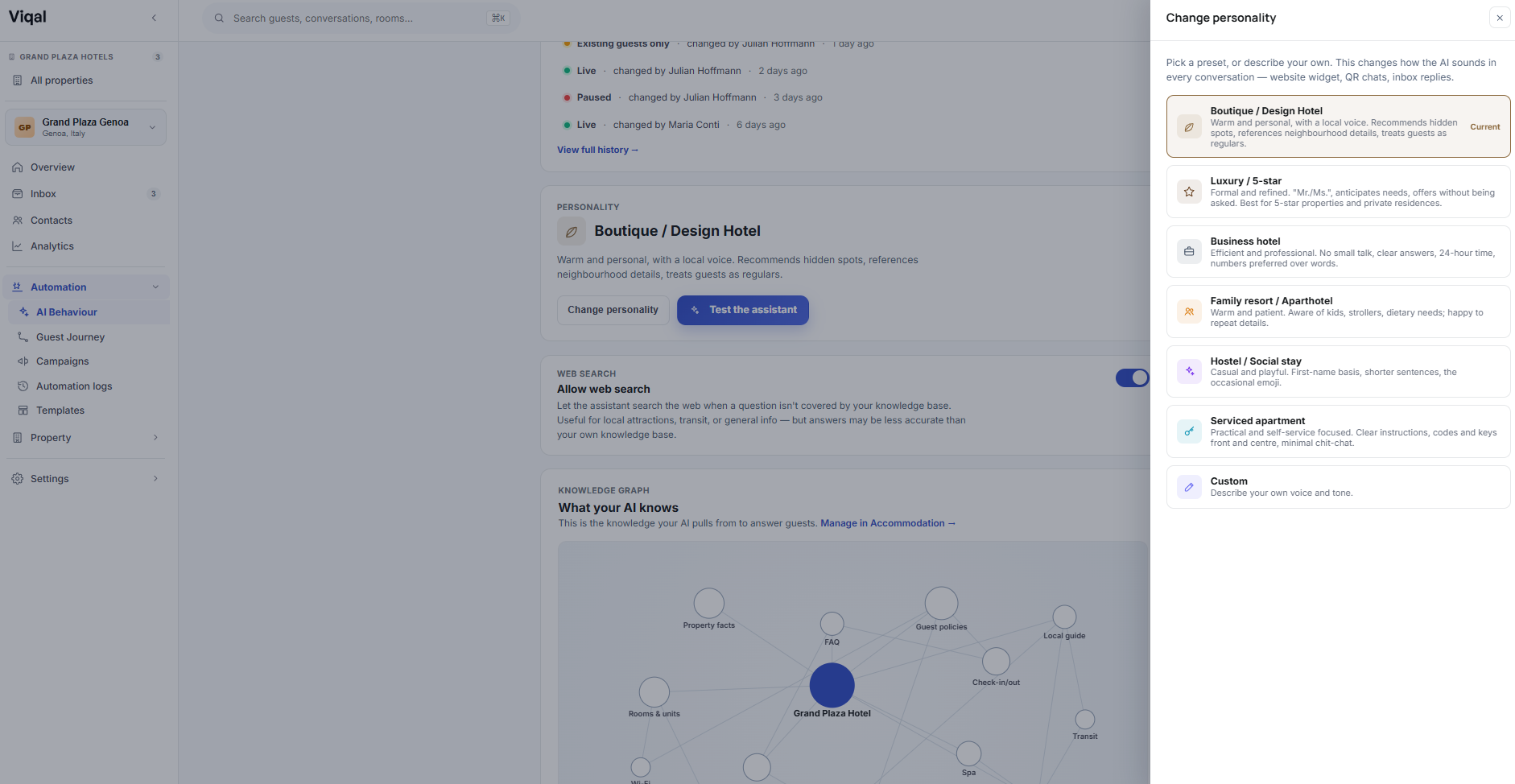
On the AI Behaviour screen, open the Personality card and select Change personality.
Choose a preset (below), or Custom to write your own tone.
Save — it applies across your website widget, QR-code chats and Inbox AI replies.
Boutique / Design hotel — warm and personal, with a local voice.
Luxury / 5-star — formal and refined; uses titles and anticipates needs.
Business hotel — efficient and professional; clear answers, no small talk.
Family resort / Aparthotel — warm and patient; aware of kids and dietary needs.
Hostel / Social stay — casual and playful; first-name basis.
Serviced apartment — practical and self-service focused; codes and keys front and centre.
Custom — describe your own tone in your own words.
Choose Custom to describe your own tone — formality, brand voice, things to emphasise or avoid. The clearer the description, the more consistent the result.
Web search
Web search lets your assistant look something up online when the answer isn't in your own knowledge — useful for local attractions, transit or current information. Toggle Allow web search on the AI Behaviour screen; it's on by default. Your own knowledge is always the most reliable source, so keep building it out — but with web search on, the AI can still help when a question falls outside what you've given it.
Testing your AI
Before your AI talks to real guests, see how it answers.
Select Test the assistant.
Type a question a guest might ask — "What time is check-in?", "Is there parking?" — and send it.
Check the reply and the source it cites (for example, your Guest policies).
If an answer is wrong or vague, fix the knowledge in Property Setup using the source shown; if the tone is off, adjust your personality and test again.
[IMAGE: Test the assistant sandbox]
Keeping answers consistent
When your sources disagree (say, check-in is 14:00 in one place and 15:00 in another), the AI can't know which is right. Consistency checks surface these conflicts so you can resolve them — see Sources in Property Setup, the canonical home for keeping answers consistent.
When the AI escalates or is paused
The AI hands some conversations to your team, and you can dial how much it's doing overall. See Escalations and handoff and When the AI is active vs paused.
Was this helpful?
Still need help? Ask the team